
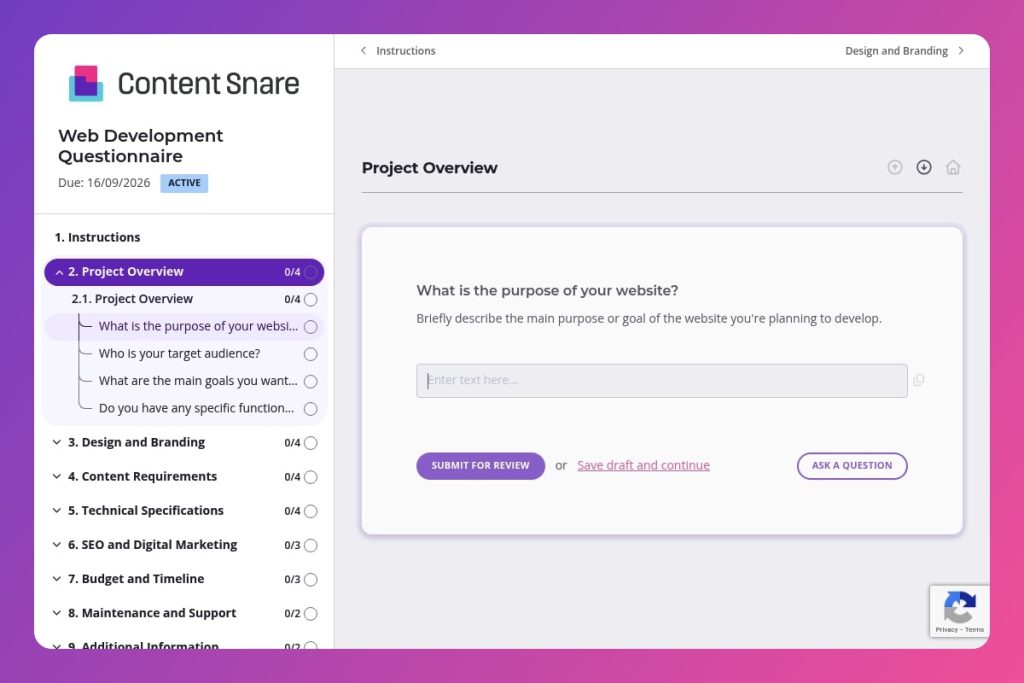


A comprehensive intake questionnaire that captures project scope, technical requirements, design preferences, budget constraints, and timeline expectations before web development begins.

Digital agencies, web development studios, and freelance developers who need to gather detailed client requirements and prevent scope creep on website build projects.

Immediately after initial client contact and before the discovery call or sales meeting, so responses can guide informed conversations and accurate project proposals.
How many project kickoffs have derailed because a client forgot to mention they need multi-currency checkout - three weeks into development? Misaligned expectations cost digital agencies thousands in revisions, scope creep, and strained client relationships. A web development questionnaire solves this by capturing critical details upfront: project goals, technical requirements, budget constraints, and design preferences.
This post covers what makes an effective web development questionnaire, how to customize it for different client types, and where to grab a free template you can deploy immediately. You'll learn which questions prevent costly miscommunication and how to structure responses for smoother project handoffs. Let's break it down.
Project Overview
Use these to frame scope, success metrics, and functional requirements. They anchor discovery and keep stakeholders aligned.
Design and Branding
Capture visual direction and constraints to align UI decisions with brand and reduce iteration.
Content Requirements
Define content scope to inform IA, copy production, and asset workflows.
Technical Specifications
Establish stack, commerce needs, integrations, and responsive expectations to shape architecture and delivery.
SEO and Digital Marketing
Align build scope with acquisition and measurement so tracking and optimization land on day one.
Budget and Timeline
Set constraints that drive prioritization, phasing, and resourcing.
Maintenance and Support
Plan post‑launch ownership, SLAs, and training to avoid gaps after handoff.
Additional Information
Surface edge cases, constraints, and stakeholder mapping that influence delivery.
Send it before the sales call: Share the web development questionnaire immediately after initial contact, then use their responses to guide your discovery conversation. You'll show up prepared with intelligent questions about their CMS preferences or third-party integrations, not wasting billable time on basics.
Flag the budget question as optional but strategic: Clients often skip budget questions when they're required. Make it optional with a note like "helps us tailor recommendations to your needs." You'll get more honest answers about their financial constraints, saving everyone from proposing solutions they can't afford.
Use design preference answers to build a mood board: When clients list websites they admire, screenshot those examples and compile them into a visual reference document before your next meeting. This transforms vague aesthetic discussions into concrete conversations about navigation styles, color palettes, and functionality they actually want.
Create a follow-up checklist from incomplete answers: Clients rarely answer every question thoroughly on the first pass. Extract the gaps - missing content details, unclear technical specs, undefined maintenance needs - into a prioritized list for your kickoff call. You'll address ambiguity systematically instead of discovering it mid-project.
Archive responses as your project brief foundation: Don't let questionnaire answers sit in isolation. Copy key responses directly into your statement of work, technical specifications, and project timeline documents. When scope questions arise later, you have documented client input to reference, not conflicting memories from a months-old conversation.
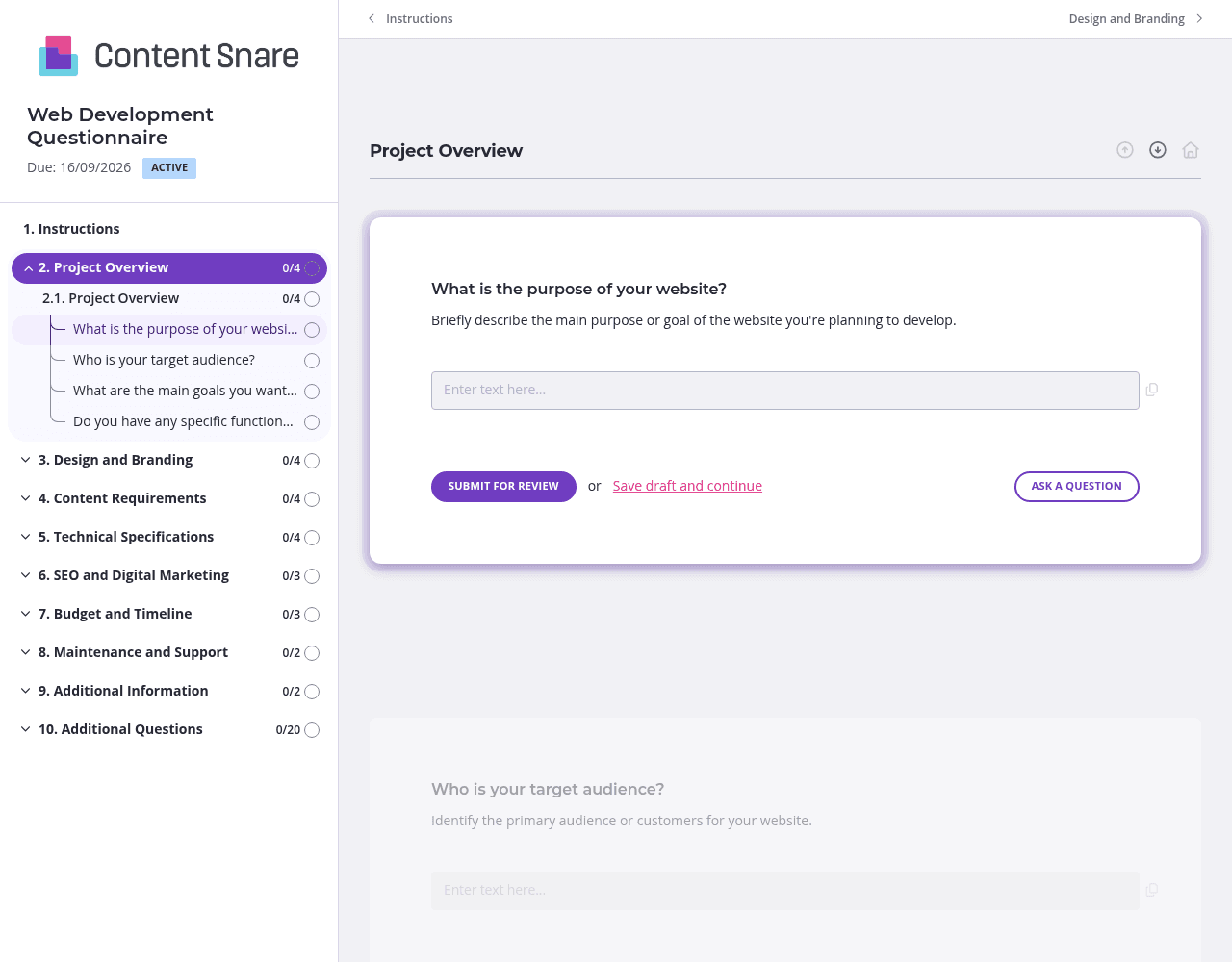
Your web development questionnaire covers everything from branding to budget - that's overwhelming in one long scroll. Split it into logical sections: Project Overview, Design & Branding, Technical Specs, and Timeline. Clients can complete one page at a time and save progress between sessions. The Technical Specifications section especially benefits from this approach, since clients often need to consult their team before answering questions about CMS preferences or third-party integrations.
Questions about design preferences and website functionality make perfect sense to you, but clients struggle with abstract concepts. Upload reference images showing different navigation styles when asking about features. Record a quick Loom video explaining what "mobile responsiveness" actually means. Drop in screenshots of CMS dashboards when asking about platform preferences. You'll get clearer, more decisive answers instead of vague responses like "whatever you think is best."
Web development questionnaires rarely get completed in one sitting - clients need input from stakeholders, have to dig up branding assets, or simply forget. Content Snare sends automatic reminders on your behalf, so projects don't languish in limbo. You won't spend mental energy tracking who owes you budget information or existing analytics data. The system handles persistence while you stay focused on actual development work.
Not every client needs every question. Someone building a simple brochure site doesn't care about e-commerce capabilities or payment gateway integrations. Set up conditional logic so technical questions adapt based on earlier answers about project scope and functionality. Clients appreciate the streamlined experience, and you get relevant information without sifting through dozens of "N/A" responses.
Email chains turn web development intake into chaos. Clients lose track of what you've asked for, you lose track of what they've answered, and critical details slip through the cracks. Content Snare centralizes everything in one organized request, automatically follows up when responses stall, and keeps your agency looking polished throughout the process.
You get hundreds of 5-star reviews across G2, Capterra, and Trustpilot for a reason - agencies finally have a professional alternative to messy email threads and static PDF forms. Content Snare is ISO 27001 certified, so you can confidently collect sensitive client information like budget details, analytics data, and stakeholder contacts. It integrates with the project management and CRM tools you already use, eliminating manual data transfer between systems.
This form is just one way digital agencies use Content Snare. You can also collect:
Thousands of agencies worldwide trust Content Snare to handle client intake professionally while saving hours every week on administrative follow-up.


